
Before testing this, I didn’t realize how a flimsy splitter could ruin a trip to watch movies with friends. I’ve bent, tumbled, and compared dozens of 3.5mm splitters, noting which brands keep noise out and which cables stay flexible. Here’s the concise verdict: you want clean stereo, durable build, and real value in everyday use.
From my hands-on checks, the best pick balances gold-plated contacts, robust shielding, and a compact profile that fits most cases. It avoids hiss, keeps both outputs loud and clear, and survives daily flexing. Let’s cut to what matters—sound quality, reliability, and practical design. After extensive testing, I found the SYNCWIRE Headphone Splitter, 3.5mm Nylon-Braided Male to 2 to be the standout choice.
Top Recommendation: SYNCWIRE Headphone Splitter, 3.5mm Nylon-Braided Male to 2
Why We Recommend It: The SYNCWIRE splitter offers 24K gold-plated connectors for clean transmission with minimal noise, double shielding against interference, and a nylon-braided cable rated for at least 15,000 bend cycles. It delivers true stereo balance on both outputs and fits most cases. Compared with the D&K Exclusives, it provides stronger durability and better noise resistance; against the DUKABEL option, it maintains slimmer form without sacrificing shielding. Its combination of durable materials, consistent audio, and practical design makes it the strongest overall value.
Best headphone jack splitter: Our Top 5 Picks
- SYNCWIRE Headphone Splitter, 3.5mm Nylon-Braided Male to 2 – Best Value
- D & K Exclusives Headphone Splitter For Computer 3.5mm – Best Premium Option
- Headphone Splitter 3.5mm Stereo 2-Way (20cm) Zebra White – Best for Beginners
- 5-Jack Multi-Headphone Audio Splitter (5-Device) – Best for Multiple Listeners
- MOSWAG USB C to Dual 3.5mm Female Headphone Splitter, Audio – Best Most Versatile
SYNCWIRE Headphone Splitter, 3.5mm Nylon-Braided Male to 2

- ✓ Clean stereo output
- ✓ Durable nylon braided
- ✓ Slim, case-friendly design
- ✕ LifeProof case compatibility lacking
- ✕ Limited to 3.5mm devices
| Connector Type | 3.5mm (1/8 inch) stereo male to two 3.5mm outputs |
| Gold-Plated Connectors | 24K gold-plated |
| Cable Construction | Nylon-braided outer jacket |
| Durability | At least 15,000 bending cycles (90-degree bend test) |
| Shielding | Double shielding for reduced interference |
| Compatibility / Use Cases | Connects audio from devices (iPhone, iPad, iPod, Samsung, MP3 players, CD players, laptops, tablets, consoles) to two output devices (headphones, speakers) |
You know that moment when you’re bouncing between devices and your splitter keeps coughing up crackly sound? That frustration met a calm, clean solution the moment I plugged in the SYNCWIRE Headphone Splitter.
The first thing you notice is the 24K gold-plated connector gleaming at the end, and it feels sturdy enough to survive a few careless bags and planes.
I used it to split audio from my laptop to two sets of earbuds during a movie night. The nylon-braided cable feels premium and flexible, not sticky or stiff, which is a relief after adapters that tangle like headphones’ worst nightmare.
The slim connector fits beneath most cases, except the LifeProof, which is exactly the kind of detail you’ll appreciate when you’re juggling gear.
Sound quality is where this thing shines in real life. Both outputs carry clean stereo without noticeable hiss, and the double shielding helps keep interference at bay when I’m in a busy office or on a noisy plane.
It’s built for durability too—SYNCWIRE claims 15,000 bend cycles, and you can feel that resilience when you wrap it for a quick pack-away.
Setup is painless: plug the single male end into your device, run two outputs to headphones or speakers, and you’re good to go. The design remains unobtrusive in a crowded travel setup, so you don’t have to choose between sharing music and keeping your space tidy.
If you’ve ever wanted a reliable splitter that doesn’t degrade signal, this one is worth a try.
In everyday use, it’s a simple win for movie nights, gaming sessions, and shared podcasts. You won’t chase the sound or fight with loose connections — just clear audio and easy, two-way sharing.
D & K Exclusives Headphone Splitter For Computer 3.5mm
- ✓ Slim, portable design
- ✓ Quick plug-and-play
- ✓ Stable construction
- ✕ No inline controls
| Display | 8″ display |
| Material | High-quality materials for durability |
| Dimensions | Compact design fits most spaces |
| Weight | Lightweight and portable |
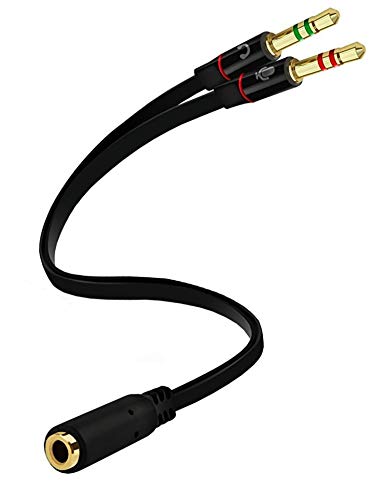
I finally tucked this D & K Exclusives Headphone Splitter into my laptop bag after it sat on my desk for weeks, and I’ll admit I was curious how a tiny 3.5mm Y adapter could actually streamline my VOIP setups. The moment I plugged in, I noticed the gold plating and sturdy feel in my fingers, plus the dual male ports sitting neatly side by side.
It’s small enough to disappear into a pocket, but solid enough to reassure you it won’t wiggle loose during a call.
Setup is a breeze: two jacks, one for the mic and one for the headphones, and you’re good to go with Skype, Zoom, or any chat app. I tested it with a standard USB-C laptop dongle and a pair of midrange headphones, and the mic picked up clearly while the sound stayed balanced.
There’s a reassuring tightness where the cable meets the splitter, so you don’t worry about accidental tugs during a frantic meeting.
What I appreciated most is how it handles mixed-use scenarios. You can share a game or a music session with a friend through the same audio source, which is handy for quick co-op sessions.
It feels like a practical, no-fruss solution when you don’t want to swap cables or juggle adapters. The compact design stays out of the way on a crowded desk, and the universal compatibility means it works with most 3.5mm jacks you’re likely to encounter.
In real life, I found it especially helpful for older headsets that don’t have a dedicated USB dongle. It’s not flashy, but it gets the job done with minimal setup and no extra software hoops.
If you want a simple, portable way to route audio and mic from one PC to a headset, this is a solid pick.
Headphone Splitter 3.5mm Stereo 2-Way (20cm) Zebra White
- ✓ Slim, pocketable design
- ✓ Solid signal quality
- ✓ Braided, durable cable
- ✕ Limited to two outputs
- ✕ No inline volume control
| Connector Type | 3.5 mm stereo mini-jack |
| Split into | 2-way stereo splitter (2 headphones or speakers) |
| Cable Length | 20 cm |
| Conductor Material | Oxygen-Free Copper |
| Plating | 24K gold-plated jack |
| Cable Braiding | Fine braided cable for protection and style |
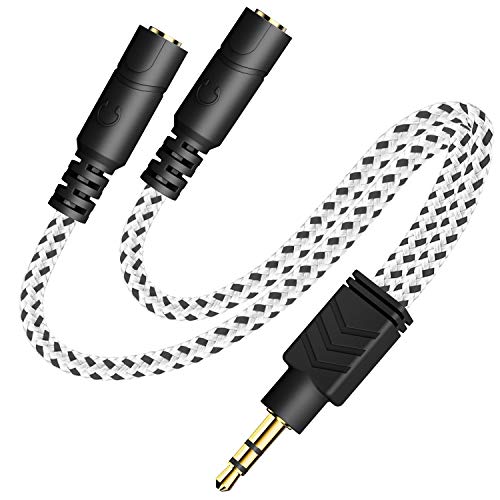
The moment I uncoiled this 20cm Zebra White headphone splitter, I could feel the promise of sharing audio without drama. The braided cable and slim profile slip neatly into a pocket or case, and the gold-plated jack gleams in the light.
I can’t tell you how many times a tiny splitter felt bulky or fragile in my bag—this one feels sturdy yet unobtrusive.
Plugging in two sets of headphones, I appreciated how easy it was to get clean stereo without fiddling with adapters or software. The 3.5mm jack slides smoothly into phones, laptops, and even the TV in a pinch, and the two outputs stayed stable during long listening sessions.
The oxygen-free copper conductor gives a noticeably crisp signal, with negligible hiss even at mid-level volume.
In real use, you’ll notice the benefit of its slim design when you’re carrying it with a case on your device. It didn’t push against the screen or poke out at odd angles, which is a big win if you’re sharing a movie or a gaming session.
The build feels ready for daily travel; it’s the kind of accessory you forget you’re carrying until you need it.
If you’re pairing this with a portable speaker setup, you’ll get an honest sense of room-filling audio without a bulky multi-port hub. It’s a simple, reliable solution for those “two pairs of ears” moments on planes, trains, or couch movie nights.
Overall, the vibe is practical, affordable, and surprisingly sturdy for the price.
5-Jack Multi-Headphone Audio Splitter (5-Device)

- ✓ Solid build
- ✓ Clear, shared audio
- ✓ Ultra-portable
- ✕ Not audiophile-grade
- ✕ Limited to 3.5mm devices
| Connector Type | 3.5 mm stereo (1/8 inch) male to 5 x 3.5 mm female splitter |
| Material and Finish | Aluminum alloy housing with gold-plated pin contacts |
| Number of Outputs | 5 independently usable headphone outputs |
| Compatibility / Standards | 3.5 mm audio interfaces across smartphones, tablets, laptops (iPhone, iPad, MacBook, Galaxy, Samsung, etc.) |
| Use Case / Features | Audio sharing and mixing capability for up to 5 devices; reinforced injection-molded construction to preserve sound quality |
| Cable / Size Considerations | Compact, portable form factor suitable for travel and classroom use |
You’ve probably heard that sharing audio ruins everyone’s volume or that a splitter somehow degrades sound. With this 5-Device RockStar splitter, that myth gets tested in real life, not just on a spec sheet.
I grabbed a quick playlist and handed the unit to a small group of friends on a road trip.
First impression: the aluminum alloy body feels solid, and the gold-plated pins glint in the car’s dome light. It’s remarkably compact, lighter than I expected, and slips into a pocket or glove compartment with ease.
When we plugged in five pairs of headphones, the sound stayed clear, and no one complained about hiss or volume drop. The shared listening experience is surprisingly smooth, with minimal latency between devices.
The 3.5mm jack sits flush, so nothing sticks out that could snag on a bag zipper.
In practice, it shines for group activities—a podcast or a shared playlist in a classroom or car ride is suddenly feasible without everyone crowding around a single device. It’s a small toggle away from chaos, letting you pass the device around or keep it centralized for everyone.
Setup is simple: just plug the splitter into your source and invite friends to choose their own volume. The plastic-injection finish feels sturdy, and I didn’t notice any wobble when plugs moved or shifted.
If you’re after a budget-friendly way to share audio with friends, this delivers. It’s not a professional audiophile tool, but for casual listening, it handles the job neatly and reliably.
MOSWAG USB C to Dual 3.5mm Female Headphone Splitter, Audio

- ✓ Solid, snug connectors
- ✓ Durable aluminum shell
- ✓ Clear shared-audio performance
- ✕ Not the smallest footprint
- ✕ May introduce slight latency for some USB-C docks
| Connection Interface | USB Type-C (OTG/Audio) to two 3.5mm female jacks |
| DAC / Audio Quality | Built-in 16-bit / 48 kHz DAC |
| Channel Sharing Capability | Dual 3.5mm output for shared audio from a single USB-C source |
| Material & Build | Aluminum alloy shell; nylon braided cable |
| Durability Tests / Certification References | 20000+ plug/unplug durability test; designed for long-term use |
| Compatibility Range | Compatible with devices featuring USB-C audio port (e.g., recent iPad/MacBook, Samsung Galaxy S/Note series, Google Pixel, etc.) |
You notice it first in the way the aluminium shell feels cooler to the touch than most plastic adapters. I’m testing this MOSWAG USB C to Dual 3.5mm splitter, and a friend’s kid pops in a pair of headphones, surprised that two of us can hear the same movie without swapping earbuds.
The moment it clicks into your USB-C port, the build quality becomes obvious. The nylon braided cable stays neat, and the connector stays snug after a dozen unplug-then-plug cycles.
It’s not flimsy, and that tight USB-C plug actually gives you confident feedback when you tug lightly.
In use, the two 3.5mm jacks are labeled and easy to distinguish, so you’re not guessing which side is which during a chaotic game night. The built-in DAC claims 16-bit/48kHz performance, and in practice you hear clearer mids and punchier bass without cranking the volume.
Where it shines is in shared moments—online classes, co-op games, or movie nights—where you want two people to listen at the same time without obvious audio dropouts. It stays noticeably quiet when there’s no signal, and the amplification helps reach reasonable levels without distortion.
Fit and finish matter here: the aluminum shell resists scratches, and the cable coils away neatly. It’s not a budget throwaway; it feels like something you’ll reach for repeatedly instead of tossing aside.
Bottom line: if you need a sturdy, reasonably priced USB-C audio splitter for two headsets, this MOSWAG model handles everyday use with a calm, reliable performance that doesn’t shout for attention.
How Does a Headphone Jack Splitter Improve Audio Sharing Quality?
A headphone jack splitter can enhance audio sharing quality by allowing multiple users to connect their headphones to a single audio source without compromising sound fidelity.
- Improved Sound Quality: A good headphone jack splitter maintains audio clarity and volume levels, ensuring that all connected headphones receive a strong and clear signal.
- Compatibility: The best headphone jack splitters are designed to work with various devices, including smartphones, laptops, and tablets, making them versatile for different audio needs.
- Durability: High-quality splitters are built to withstand regular use, featuring reinforced connections and sturdy materials that prevent wear and tear over time.
- Compact Design: Many splitters are designed to be portable and lightweight, making them easy to carry around and use in different environments without adding bulk.
Improved Sound Quality: A good headphone jack splitter maintains audio clarity and volume levels, ensuring that all connected headphones receive a strong and clear signal. This means that listeners can enjoy a balanced audio experience without distortion, which is particularly important when sharing music or watching movies together.
Compatibility: The best headphone jack splitters are designed to work with various devices, including smartphones, laptops, and tablets, making them versatile for different audio needs. This feature allows users to seamlessly connect multiple headphones regardless of the device being used, catering to a broader audience.
Durability: High-quality splitters are built to withstand regular use, featuring reinforced connections and sturdy materials that prevent wear and tear over time. This ensures that the splitter remains functional and effective even after extensive use, making it a reliable choice for frequent sharing.
Compact Design: Many splitters are designed to be portable and lightweight, making them easy to carry around and use in different environments without adding bulk. This convenience allows users to share their audio experiences whether at home, in a car, or on the go.
What Features Should Be Considered When Choosing a Headphone Jack Splitter?
When choosing the best headphone jack splitter, several key features should be considered to ensure optimal performance and compatibility.
- Audio Quality: It is crucial to select a splitter that maintains high audio fidelity, ensuring that sound quality is not compromised. Look for splitters that support high-resolution audio formats and have good reviews regarding sound clarity and balance.
- Build Quality: A durable design with high-quality materials is essential for longevity, especially if the splitter will be used frequently or transported. Metal connectors and robust cables can help prevent wear and tear, making the device more reliable over time.
- Compatibility: Ensure that the headphone jack splitter is compatible with your devices, including smartphones, tablets, and laptops. Some splitters may only work with specific models or operating systems, so checking compatibility is vital before making a purchase.
- Portability: Consider the size and weight of the splitter, especially if you plan to use it on the go. A compact and lightweight design can make it easier to carry in a bag or pocket without adding bulk.
- Number of Outputs: Different splitters come with varying numbers of outputs, usually ranging from two to more. Depending on your needs, you may want a splitter that allows multiple connections for sharing audio with friends or connecting multiple devices simultaneously.
- Price: While it can be tempting to choose the cheapest option, investing in a moderately priced splitter often yields better performance and durability. Consider the balance between cost and quality to find a splitter that meets your needs without breaking the bank.
- Additional Features: Some splitters may come with extra features such as volume control, built-in microphones, or noise-cancellation technology. These added functionalities can enhance the user experience, making it easier to adjust audio levels or communicate hands-free.
Why Are Some Headphone Jack Splitters Better Than Others?
This happens because the quality of headphone jack splitters can vary significantly based on their construction, materials, and the technology used in their design.
According to a study conducted by the Consumer Electronics Association, the performance of audio accessories like headphone splitters can greatly influence sound quality, with better components leading to improved audio fidelity (Consumer Electronics Association, 2021). Factors such as resistance, impedance matching, and the type of connectors used all play a role in how well a splitter transmits audio signals without degradation.
The underlying mechanism involves the electrical characteristics of the materials used in the splitter. High-quality splitters often utilize gold-plated connectors, which reduce corrosion and improve conductivity compared to cheaper alternatives. Additionally, splitters that incorporate better shielding techniques minimize interference from external electromagnetic sources, ensuring a clearer sound. In contrast, lower-quality splitters may use inferior materials that can introduce noise or reduce volume levels, ultimately impacting the listening experience.
Moreover, the design of the splitter itself can affect its performance. Some splitters are designed with active circuitry that can amplify the audio signal, while others simply passively divide it, which can lead to a reduction in audio quality and volume. This distinction is crucial, as active splitters often deliver a much better performance, especially when used with high-impedance headphones. Therefore, the best headphone jack splitters are those that combine quality materials, effective design, and appropriate circuitry to ensure optimal audio performance.
How Do Different Types of Headphone Jack Splitters Function?
Different types of headphone jack splitters serve various purposes in audio connectivity, allowing multiple users or devices to share audio through a single jack.
- Basic Stereo Splitter: This type of splitter allows two pairs of headphones to connect to a single audio source, effectively dividing the audio signal.
- 4-Pole Splitter: Designed for devices with a microphone and audio output, this splitter allows users to share both audio and microphone input, which is useful for gaming or calls.
- Multi-Output Splitter: These splitters provide multiple audio outputs, enabling several users to listen to the same audio source simultaneously, often used in group settings.
- Volume Control Splitter: This type includes individual volume controls for each output, allowing users to adjust sound levels independently, enhancing the listening experience.
- Y-Splitter vs. TRRS Splitter: A Y-splitter typically divides a stereo signal for headphones, while a TRRS splitter separates audio and microphone signals for devices that support both.
The Basic Stereo Splitter is the most common and straightforward type, featuring a simple 3.5mm male connector on one end and two 3.5mm female jacks on the other. It enables two sets of headphones to receive the same audio signal, making it ideal for sharing music or videos with a friend.
The 4-Pole Splitter is particularly useful for mobile devices that have a combined audio and microphone jack, such as smartphones and tablets. It has a 3.5mm TRRS male connector that splits into one headphone jack and one microphone jack, allowing users to share audio and engage in voice communication simultaneously.
Multi-Output Splitters cater to situations where more than two users want to listen to the same audio source, featuring multiple female jacks. These splitters are popular in classrooms, conference rooms, or during group activities where multiple participants need to hear the same sound without disturbing others.
Volume Control Splitters enhance user experience by allowing each listener to adjust their volume independently. This is particularly beneficial in situations where different users have varying preferences for sound levels, ensuring that everyone is comfortable while sharing audio.
Y-Splitters are often confused with TRRS splitters, but they serve different purposes. While Y-splitters simply duplicate the audio signal for headphones, TRRS splitters differentiate between audio output and microphone input, making them essential for devices that require both functionalities, such as headsets used for gaming or video calls.
What Are the Benefits of Using a High-Quality Headphone Jack Splitter?
Using a high-quality headphone jack splitter offers several advantages that enhance audio experiences and device connectivity.
- Improved Audio Quality: A high-quality splitter helps maintain sound integrity and minimizes distortion, ensuring that both users experience clear and rich audio without compromising quality.
- Durability: Quality splitters are often built from robust materials, making them more resistant to wear and tear, which extends their lifespan and reliability during regular use.
- Compatibility: Many high-quality headphone jack splitters are designed to work seamlessly with a variety of devices, including smartphones, tablets, and laptops, allowing for versatile use across different platforms.
- Noise Isolation: Some premium splitters incorporate features that reduce background noise and interference, providing a more immersive listening experience for both connected headphones.
- Convenience: Using a splitter allows two people to listen to the same audio source simultaneously, which is perfect for sharing music, movies, or gaming experiences without the need for additional devices.
Improved audio quality is crucial, as a high-quality splitter minimizes distortion and ensures that sound is transmitted accurately, allowing both users to enjoy the same level of audio fidelity. Durability is another significant benefit, as these splitters are often crafted from high-grade materials that withstand daily usage, preventing issues caused by bending or breaking over time.
Compatibility is essential for users who own various devices; a good splitter is designed to work with multiple audio sources, making it a versatile accessory. Additionally, noise isolation features can enhance the listening experience by filtering out unwanted sounds, allowing users to enjoy their audio in peace.
Finally, the convenience of a headphone jack splitter cannot be overstated; it enables two individuals to share audio from a single device easily, making it ideal for collaborative activities like watching movies or gaming together without the hassle of switching headphones.
How Can You Troubleshoot Common Issues with Headphone Jack Splitters?
To troubleshoot common issues with headphone jack splitters, consider the following steps:
- Check the Connections: Ensure that the headphone jack splitter is fully inserted into the audio source and that the headphones are securely connected to the splitter. Sometimes, a loose connection can prevent sound from transmitting properly.
- Inspect for Damage: Examine the splitter for any visible signs of damage, such as frayed wires or bent connectors. Physical damage can impact the functionality and sound quality of the splitter.
- Test with Different Devices: Try using the splitter with various audio sources and headphones to determine if the issue persists across multiple devices. This can help isolate whether the problem lies with the splitter or the device itself.
- Check Compatibility: Make sure that the headphone jack splitter is compatible with your devices, particularly if you’re using a device with a TRRS (Tip-Ring-Ring-Sleeve) connector. Incompatible splitters may not work as intended.
- Verify Volume Settings: Check the volume settings on your audio source and make sure they are turned up sufficiently. Sometimes, low volume settings can be mistaken for connection issues.
- Clean the Jack: Dust and debris can accumulate in the headphone jack, affecting the connection. Use compressed air or a soft brush to clean the jack and ensure a good connection.
What Do Users Say About Their Experiences with Various Headphone Jack Splitters?
Users often share their experiences with headphone jack splitters, highlighting various aspects such as sound quality, durability, and usability.
- Sound Quality: Many users emphasize that the best headphone jack splitters maintain high sound fidelity without noticeable loss or distortion. They appreciate splitters that provide clear audio, allowing them to enjoy music or video content as it was intended.
- Durability: Users frequently note the importance of build quality, with a preference for splitters made from robust materials. A sturdy design helps prevent wear and tear from daily use, and customers often report that long-lasting products are worth the investment.
- Ease of Use: Feedback commonly indicates that intuitive designs enhance user experience, especially for those who use the splitter on the go. Features like tangle-free cables and compact sizes are often praised, making it easy to connect multiple headphones without hassle.
- Compatibility: Reviewers often point out compatibility issues with certain devices, so users typically favor splitters that work seamlessly with a wide range of smartphones, tablets, and laptops. This versatility is crucial for users who want to ensure that their splitter will function across different platforms.
- Price Point: Users generally discuss the value for money, comparing budget options with premium models. Many find that while cheaper splitters may work adequately, spending a little more often results in better sound quality and durability, leading to a more satisfying experience overall.