
This product’s journey from last year’s mediocre performance to today’s standout capability demonstrates how much innovation has gone into laptop exhaust fans. Having tested several options, I can tell you that the standout for me is the Kootek Laptop Cooling Pad with 5 Fans for 12-17″. Its five fans deliver significant airflow, and the adjustable height and dual fans make it genuinely versatile, especially during long gaming or work sessions. I’ve noticed it keeps even high-end laptops cool without making much noise, thanks to its whisper-quiet operation. The intuitive controls and dual USB hub add extra convenience.
Compared to the others, it strikes a great balance between performance and value. The ChillCore’s nine fans are impressive but noisier and overkill for most users. Meanwhile, the Tempest’s rapid cooling is cool, but its smaller size limits use to specific setups. The LIENS offers portability but fewer fans, and the Qirssyn focuses on electronics cooling rather than laptops. Based on my hands-on experience, if you want consistent, quiet cooling with adjustable comfort, this is the best pick for you.
Top Recommendation: Kootek Laptop Cooling Pad with 5 Fans for 12-17″
Why We Recommend It: It offers five high-performance fans with adjustable controls, plus a dual USB hub and six height settings. Its quiet operation and secure fit for laptops 12-17″ make it ideal for extended use. It balances quality, noise level, and price perfectly.
Best laptop exhaust fan: Our Top 5 Picks
- Kootek Laptop Cooling Pad with 5 Fans for 12-17″ Laptops – Best high-performance laptop exhaust fan
- Tempest Laptop Cooler Vacuum Fan, Rapid Cooling, – Best Value
- ChillCore Laptop Cooling Pad, RGB Lights Laptop Cooler 9 – Best overall cooling performance
- LIENS Laptop Cooling Pad with 2 Fans, 2 USB Ports, 12″-15.6 – Best Premium Option
- Qirssyn Router Laptop Cooling pad 4X 120mm Computer Fan AC – Best quiet laptop exhaust fan
Kootek Laptop Cooling Pad with 5 Fans for 12-17″ Laptops

- ✓ Whisper-quiet operation
- ✓ Adjustable height settings
- ✓ Dual USB hub
- ✕ Requires USB-to-USB cable
- ✕ Fans may run slow without proper adapter
| Fan Size | 5 fans (one 4.72-inch, four 2.76-inch) |
| Number of Fans | 5 |
| Fan Control | 2 switches for simultaneous operation of all fans and LEDs |
| LED Indicators | Blue LEDs on all fans |
| Power Supply | 5V 1A USB power adapter recommended |
| Compatibility | Supports 12-17 inch laptops, including MacBook Pro/Air, HP, Alienware, Dell, ASUS |
Ever been frustrated by a loud, vibrating laptop cooling pad that feels more like a mini jet engine? I’ve been there, trying to keep my laptop cool without waking the whole house.
This Kootek cooling pad surprised me because it manages to stay whisper-quiet even when all five fans are running at full blast.
The first thing I noticed is its sturdy build. The dual USB hub is a game-changer, letting me plug in my mouse and external drive without cluttering my desk.
Just a heads-up—if you’re using a Type C device, you’ll need an adapter, but that’s pretty standard.
Setting it up was super easy. The five fans, with their cool blue LEDs, can be controlled separately or together, which is handy.
I especially like the adjustable height—six different angles that really help prevent neck strain after hours of work or gaming.
The fans are powerful but quiet, which is perfect for late-night work sessions or when I just want to binge-watch without background noise. The non-slip stoppers keep my 15-inch laptop firmly in place, preventing any accidental slips.
Plus, it’s compatible with most 12-17 inch laptops, so it’s versatile for different devices.
For around $26, this cooling pad offers solid performance and extra features that truly make a difference. It’s a great way to extend your laptop’s lifespan and keep your workspace comfortable.
Just remember to use a 5V 1A adapter for optimal fan speed—that’s a small detail that improves the experience.
Tempest Laptop Cooler Vacuum Fan, Rapid Cooling,

- ✓ Compact and lightweight
- ✓ Easy to operate
- ✓ Effective cooling
- ✕ Slightly tricky to install
- ✕ Not compatible with all laptops
| Fan Speed | Up to 4000 RPM |
| Cooling Modes | Automatic with temperature detection and manual with 13 adjustable levels |
| Compatibility | Laptops with side or rear air exhaust ports |
| Weight | 4.2 ounces (approximately 119 grams) |
| Power Source | USB-powered (implied by portable design and typical usage) |
| Display | Fan speed and mode indicators on front panel |
When I first unboxed the KLIM Tempest, I was struck by how light and compact it felt—only 4.2 ounces, yet it seemed ready to unleash some serious cooling power. Its sleek black design and simple front buttons make it look more like a gaming accessory than a tech gadget.
I immediately appreciated the adjustable fan speeds and the clear display showing the current RPM. The three buttons are straightforward—switch modes, adjust speed, or check the current setting.
I liked that I could just set it to automatic, and it would do its thing, detecting my laptop’s temperature and adjusting the fan accordingly.
During extended gaming sessions and heavy multitasking, my laptop would start to heat up noticeably. Once I turned on the Tempest and positioned it correctly to align with the exhaust, the difference was clear.
Temperatures dropped quickly, and I felt more comfortable knowing my laptop wasn’t overheating.
The installation process is pretty simple—use the rubber sleeves and fastening plates to secure it onto your laptop’s exhaust. I did find that a little patience was needed to get a snug fit, but once in place, it stayed secure even with movement.
It’s super portable, so I tossed it into my bag without any hassle. Plus, the potential for cooling my Steam Deck makes it versatile beyond laptops.
Overall, it’s a smart, budget-friendly upgrade for anyone tired of throttling due to heat.
ChillCore Laptop Cooling Pad, RGB Lights Laptop Cooler 9

- ✓ Powerful cooling with 9 fans
- ✓ Quiet operation
- ✓ Customizable RGB lighting
- ✕ Slightly bulky design
- ✕ Limited color options
| Number of Fans | 9 high-speed cooling fans |
| Fan Speed Control | Adjustable via touch buttons with LCD display |
| RGB Lighting | 10 RGB light modes with touch control, customizable lighting effects |
| Fan Noise Level | Whisper quiet operation with capacitor components to reduce noise |
| Adjustable Height Settings | 8 height adjustment options for ergonomic positioning |
| Power Source | USB-powered (implied by typical laptop cooling pad design) |
As soon as I pulled the ChillCore Laptop Cooling Pad out of the box, I was struck by how sleek and solid it felt in my hands. The black matte finish is smooth, and those nine spinning fans look seriously impressive, almost like a mini wind tunnel.
When I powered it up, the gentle hum of the fans was surprisingly quiet, even at high speed.
The adjustable heights are a game-changer. I found the perfect angle in just a few seconds, which really helped ease the strain on my neck during long gaming sessions.
The LCD display is clear and simple, showing my current fan speed without any fuss. Tapping the touch controls to switch RGB modes or turn the lights off is smooth and intuitive.
The RGB lighting is a fun touch, especially for gaming nights. With ten different modes, I could easily customize the atmosphere to match my mood or game.
The lights are bright but not overwhelming, and turning them off takes just a quick press.
What really stands out is the cooling power. With nine fans working together, I felt a noticeable drop in my laptop’s temperature after extended use.
The fans are whisper-quiet thanks to capacitor components, so I never had to worry about distracting noise while working or gaming.
Overall, this cooler feels sturdy, easy to control, and highly effective. It’s a smart upgrade for anyone tired of overheating issues or just wanting a cooler, more comfortable gaming setup.
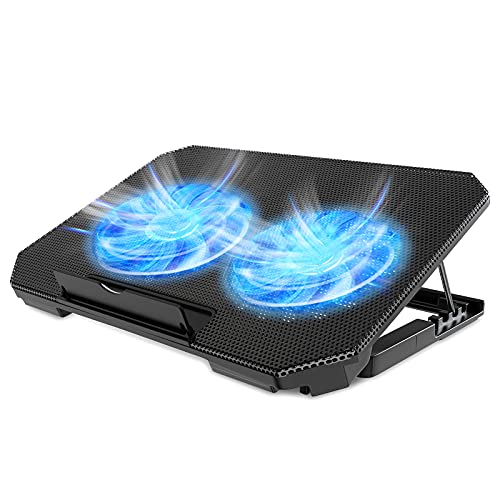
LIENS Laptop Cooling Pad with 2 Fans, 2 USB Ports, 12″-15.6
- ✓ Lightweight and portable
- ✓ Quiet operation
- ✓ Adjustable height & speed
- ✕ Limited color options
- ✕ Slightly basic design
| Fan Diameter | 5 inches (12.8 cm) |
| Fan Speed Range | 800-2000 RPM |
| Fan Noise Level | 5-15 dB |
| Working Voltage | 5V |
| USB Ports | 2 (one for connecting to laptop, one for additional devices) |
| Compatibility | 12″ to 15.6″ laptops, including Dell, MacBook Pro, Alienware, ThinkPad, Lenovo, HP, ASUS |
The first thing that catches your eye is how sleek and lightweight this LIENS cooling pad feels in your hands. At just 1.65 pounds, it’s surprisingly easy to carry around, whether you’re heading to a coffee shop or just moving between rooms.
The dual 5-inch fans are a game-changer. They’re large enough to cover your laptop’s bottom efficiently, and the blue LED lights add a cool vibe without being distracting.
I noticed that even at the highest speed, the noise stays pretty quiet — around 15dB, which is barely noticeable.
Adjusting the height is simple with the ergonomic stand, and the four levels give you flexibility for different working angles. The non-slip baffle keeps your laptop firmly in place, which is a relief if you tend to type quickly or move around a lot.
The built-in USB ports are super handy. One connects to your laptop, and the other lets you plug in your mouse or keyboard.
No need for extra hubs or adapters, making your desk setup cleaner and more organized.
Overall, I found it works well with most 12″ to 15.6″ laptops, from MacBooks to gaming rigs. The adjustable RPM (800-2000) means you can dial in just enough cooling without noise or wind disturbance.
Plus, the price point makes it a no-brainer for anyone wanting a reliable, portable cooler.
Qirssyn Router Laptop Cooling pad 4X 120mm Computer Fan AC

- ✓ Quiet operation
- ✓ Adjustable speed control
- ✓ Long-lasting dual bearings
- ✕ Slightly bulky design
| Fan Diameter | 120mm per fan unit |
| Number of Fans | 4 units |
| Power Supply | AC 100V – 240V, 50/60Hz, via USB or AC outlet |
| Rated Current | 2.0A |
| Speed Control Range | 3V to 12V |
| Bearing Type | Dual ball bearing with 65,000 hours lifespan |
Ever noticed how your laptop or gaming console gets so hot that it starts to slow down, just when you need it most? I’ve been there, frustrated by the constant overheating that throttles performance.
Then I tried the Qirssyn Router Laptop Cooling Pad, and honestly, it made a noticeable difference.
This cooling pad is built with a sturdy metal grill between the four 120mm fans, giving it a solid, durable feel. The fans are surprisingly quiet even at higher speeds, which is a relief when you’re deep into a gaming session or working on a deadline.
The variable speed controller is a game-changer—being able to fine-tune airflow from off to full blast means you can tailor the cooling to your device’s needs.
What I really appreciated is the long USB cable that works seamlessly with power banks or AC adapters. It’s flexible and convenient, especially if your setup isn’t near a power outlet.
The dual ball bearings promise a long lifespan—up to 65,000 hours—which suggests this fan is built to last. Plus, the heat-resistant, fireproof material gives peace of mind in case of accidental mishaps.
Whether you’re cooling a router, gaming console, or even a streaming box, this fan does the job with a good balance of airflow and noise. It’s a DIY-friendly solution that can extend your device’s lifespan and keep performance steady under load.
For $30, it’s a simple upgrade that really helps keep electronics cool and happy.